How to generate QR Codes for 100+ products
Give every product a permanent URL on your own domain, build a two-column CSV (URL, SKU) in a spreadsheet, generate it in batches of up to 200 and file the PNGs by SKU. Because the codes are static and StyloQR does not track scans, the URL scheme has to be right before anything is printed.
Decide the URL scheme before you touch a generator
The expensive mistake in a product-code project is not a bad logo or a wrong color. It is encoding links that will not last. A QR Code printed on a package or a shelf label lives as long as that item does, often years, and the link inside it cannot be edited. StyloQR generates static codes only: what you encode is what stays encoded, and there is no redirect layer and no scan statistics. Every decision below follows from that.
A durable scheme has these properties:
- Your own domain.
https://shop.example.com/p/KT-1001is yours to keep. A link on a third-party short-link site, a marketplace listing or a social media post depends on someone else staying put. - A stable identifier in the path. Use the SKU or an internal product ID, not the product title or a category path that may be renamed.
/p/KT-1001survives a rename;/kitchen/blue-ceramic-mug-largedoes not. - No temporary parts. Do not encode session IDs, expiring tokens, staging or preview hosts (
staging.,localhost, a test subdomain), or a campaign page you plan to delete. - Short and regular. Shorter content makes a less dense code that scans more easily, and a regular pattern makes the batch look uniform and easy to check.
- One SKU, one URL, forever. Do not recycle a SKU for a different product. If a product is discontinued, keep the URL alive and have the page say so, or send visitors to a replacement from your own web server.
That last point is where the flexibility lives. You cannot change the code, but you control what your own web server does when someone visits /p/KT-1001. If the product page moves, a redirect on your site keeps every printed code working. This requires access to your website, and it is standard web practice; it is not a feature of the QR Code or of StyloQR.
Organize the catalog first
Start from a clean export of your product list (from your shop platform, ERP or a spreadsheet). You need only two things per product: a unique ID and the page that ID belongs to. Then:
- Remove what will not get a code: discontinued items, bundles that share a page, internal-only parts.
- Check that the ID is unique (sort the column, or use duplicate highlighting) and has no spaces, accents or slashes. Those cause trouble in both URLs and file names.
- Decide the granularity. One code per SKU gives exact matching but needs one URL per variant; one code per product family needs fewer codes but sends everyone to the same page. Choose based on what the destination page can do, not on what is easiest to generate.
- Confirm every destination exists. Open a sample of the URLs, and for a full check run a link checker or a spreadsheet lookup against your site's URL list. A dead link on 100 labels is 100 reprints.
Build the CSV
In the sheet, put the SKU in column A. In column B build the link with a formula, in column C the file name, then copy columns B and C into a new sheet as values only. StyloQR reads the first column as the content and the second column as the file name, so the export has the URL first and the SKU second, and no header row. A six-row sample looks like this:
https://shop.example.com/p/KT-1001,KT-1001
https://shop.example.com/p/KT-1002,KT-1002
https://shop.example.com/p/KT-1003,KT-1003
https://shop.example.com/p/MG-2001,MG-2001
https://shop.example.com/p/MG-2002,MG-2002
https://shop.example.com/p/MG-2003,MG-2003
Rules that save you from re-exporting: export as CSV UTF-8, no header, no commas inside URLs, no line breaks, and format any numeric-looking SKU column as Text so leading zeros survive. The pitfalls are explained in detail in bulk generating QR Codes from a CSV.
Name the files after the SKU
Using the SKU as the file name means the product, the label design file and the code all share one key. A few conventions that hold up:
- Name = SKU exactly as in your system:
KT-1001.png. - Keep names to letters, digits, hyphens and underscores. StyloQR replaces other characters with an underscore and cuts names at 60 characters.
- If you must separate sets, prefix them:
EU_KT-1001,US_KT-1001. Do not rely on the ZIP to separate duplicates, because two identical names are a conflict. - Never rename files by hand in bulk without keeping the mapping. The file name is your only link back to the data.
Generate in batches
The Pro batch tool in the StyloQR Chrome extension takes up to 200 rows per batch. The arithmetic is simple:
| Products | Batches | Split |
|---|---|---|
| 100 | 1 | 100 |
| 200 | 1 | 200 |
| 230 | 2 | 200 + 30, or 115 + 115 |
| 500 | 3 | 200 + 200 + 100 |
Split along natural lines (a product category or SKU prefix) rather than at an arbitrary row, so each ZIP matches one print job. Then:
- In the Style tab choose a simple, high-contrast look: dark dots on a light background. The style applies to the whole batch. A logo is optional; if you add one, StyloQR switches to the highest error correction level automatically, which makes the code denser (see adding a logo).
- In the Batch tab paste the list or upload the CSV, check the row count shown against your sheet, and click Generate QR Codes.
- Keep the popup open until the ZIP downloads. The result is one PNG per row.
- For the first run, generate only the first six rows. Scan them, then run the full list.
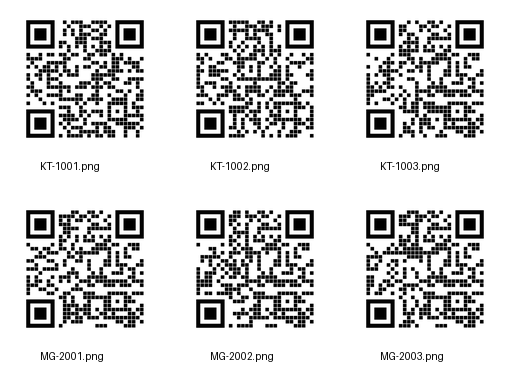
Organize, archive and hand off
- Unzip into one folder per batch, named by date and category, and keep the exact CSV you used next to it. That pair is your record of what was generated.
- Count the files against the rows. A row that could not be turned into a code is replaced by a text file in the ZIP, so look for stray text files.
- Keep the ZIP. If you need to reproduce the set, regenerating from the same CSV and style gives the same codes, but only if you recorded the style (StyloQR's history can save codes in folders and tags for this).
- Hand designers a lookup, not a pile. Give them the folder plus the CSV so each label design can pull the file by SKU.
The batch gives you PNG files only. PNG is fine for labels when it is large enough for the print size; for very large prints, make that single code as an SVG instead. The trade-offs are covered in PNG vs SVG vs PDF.
Place codes on labels and packaging
Size, quiet zone and surface matter more than the generator. The rules of thumb: leave the four-module margin clear, keep strong contrast, and print at a size that suits scanning distance. The practical sizes and the reasoning are in QR Code size for print; packaging-specific issues such as curved surfaces, glossy film and varnish are in QR Codes on packaging. Put the code where a hand or a seam will not cover it, and consider printing the short URL or the SKU next to it so a person can type it if the code is damaged.
Before the whole run goes to the printer, follow the pre-print test: print a few codes on the real material at the real size, and scan them from the real distance with at least two phones.
Common mistakes with product codes
- Encoding the wrong thing. A link to a preview environment, an unfinished page or a tracking redirect you do not own.
- Relying on analytics that do not exist. StyloQR does not record scans. If you need to know how many people visit a product page, your own website analytics can count visits to the page (for example from campaign parameters you add to the link), but that is a measure of page visits, not of scans.
- Leaving a header row in and shipping 101 codes where one says "url,sku".
- Letting a spreadsheet damage SKUs:
00451turned into451, or1E5read as a number. - One style for everything without a test. A low-contrast brand color or a large logo can make a code unreliable on a glossy label.
- Changing the URL scheme later. Then printed codes break. If you will migrate your shop, make the old paths redirect.
- Printing before checking a sample at full size. A code that looks fine on a screen can fail on a small label.
Worked example: 500 products, three batches
A shop has 500 SKUs across two ranges, with IDs such as KT-1001 and MG-2001.
- The team agrees on
https://shop.example.com/p/<SKU>and confirms that the site will keep every SKU page alive and redirect it if a product is retired. - In the sheet, column A holds the SKUs, column B the formula
="https://shop.example.com/p/"&A2. A duplicate check finds two repeated SKUs, which are fixed. - They spot-check 10 URLs in a browser, then paste values into a new sheet: URL in column A, SKU in column B, no header. Export as CSV UTF-8.
- Because StyloQR's limit is 200 rows per batch, they split into 200 (the KT range), 200 (the MG range) and 100 (the rest).
- They set one style (black on white, square dots), generate the first six rows of the KT file, and scan them on two phones. Then they run the three batches and get three ZIPs of PNGs named by SKU.
- They confirm 200 + 200 + 100 = 500 image files, print a sample label sheet on the real label stock, scan it, and send the folders and CSVs to the printer.
Remember what you cannot do afterward: if a printed code is wrong, you reprint it. StyloQR cannot change a code's destination or report scans. If that is a dealbreaker for your project, read static vs dynamic QR Codes first.
Conclusion
Spend the effort where it cannot be redone: a permanent URL on your own domain, SKU-based names, a checked CSV and a printed sample. Generation itself is the fast part, one batch of up to 200 codes at a time.
Frequently asked questions
How many QR Codes can I generate at once in StyloQR?
Up to 200 per batch with StyloQR Pro. For 500 products, run three batches, for example 200, 200 and 100, ideally split by category or SKU prefix.
What should each product QR Code link to?
A stable page on your own domain keyed by the SKU or product ID, such as /p/KT-1001. Avoid temporary links, preview or staging hosts, session parameters and third-party pages you do not control.
Can I change a product's link after the labels are printed?
Not in the code. StyloQR codes are static, so the printed link is final. If a page moves, you can redirect the old URL on your own web server so the printed code keeps working.
Does StyloQR tell me how many times each code was scanned?
No. StyloQR does not track scans. If you need visit numbers, use the analytics of the website the code points to, which measures visits to the page rather than scans.
What file name should I use for each product code?
Use the SKU exactly as it appears in your system, for example KT-1001. StyloQR limits file names to letters, digits, underscores, hyphens and dots, and cuts them at 60 characters, so keep SKUs within that.
What do I get after generating a batch?
One ZIP file containing a PNG for each row of the list. PNG is the only batch output; for a vector file, create that individual code in the single-code generator and export SVG.
Try StyloQR free
Install the Chrome extension. Single QR Codes are free; Pro is a one-time $9.90 and adds batches, animation, history, and gradients.
Add to Chrome — it's free