QR Codes for business cards and contact sharing
For a business card, a QR Code that links to a contact or profile page is the simplest and most reliable choice. You can also embed a vCard directly, but every extra field makes the code denser and smaller squares are harder to scan on a 85 mm card.
A QR Code on a business card should save the other person typing. There are two ways to do that: encode the contact details themselves (a vCard), or encode a link to a page that has them. They behave very differently on a small piece of card stock.
What a vCard is
A vCard is a plain-text format for contact data. It is defined in RFC 6350 (vCard 4.0), uses the text/vcard media type and UTF-8, and each line is a property. According to that RFC, the mandatory properties are BEGIN:VCARD, VERSION (4.0), FN (the formatted name) and END:VCARD. Common optional ones include N (structured name), TEL, EMAIL, ORG, TITLE, URL, ADR (address), NOTE and PHOTO.
A minimal vCard is:
BEGIN:VCARD
VERSION:4.0
FN:Jane Doe
END:VCARD
Older revisions of vCard (for example version 3.0) are still around, and I have not verified which version each phone accepts. That is one reason to test, below.
Option A: a QR Code with a vCard inside
StyloQR’s templates are Instagram, YouTube, WhatsApp and Event. There is no vCard template. But the content field accepts any text, so you can type or paste a vCard (from BEGIN:VCARD to END:VCARD) and StyloQR will encode it exactly as written. That means you write the vCard yourself, check line by line that it is valid, and keep it short.
Whether a phone offers to save the contact when it reads such a code depends on the phone, its camera app and the version of the vCard. Test on the phones your contacts actually use; do not assume.
How dense does a vCard get?
Every character is encoded, so each extra field adds modules. These are real figures from the engine StyloQR uses (error correction M), for the samples in the figure:
| Content | Characters | Grid | Total width with margin | Module size on a 20 mm code |
|---|---|---|---|---|
Link to a page (https://example.com/jane) | 24 | 25 × 25 | 33 modules | 0.61 mm |
| Short vCard: name, phone, email | 85 | 41 × 41 | 49 modules | 0.41 mm |
| Long vCard: name, organization, title, two phones, email, website, address, note | 328 | 69 × 69 | 77 modules | 0.26 mm |
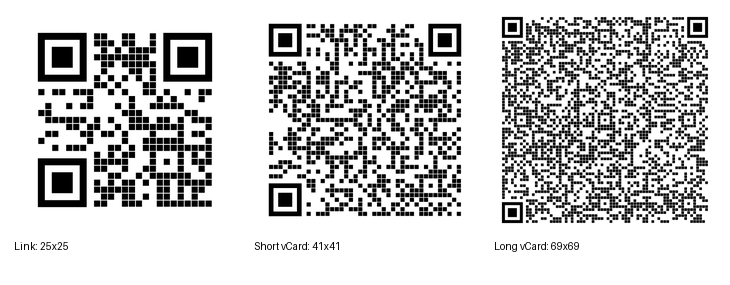
The last column is simple division: a 20 mm code area divided by the number of modules including the four-module margin. On a printed card, the long vCard needs modules about 0.26 mm across, less than half the link code’s 0.61 mm. Smaller modules are more likely to blur or fill in with ink, especially on uncoated or textured card stock. For reference, GS1 UK recommends modules of at least 0.396 mm for its own consumer-pack codes (a different use), which gives a feel for how fine 0.26 mm is.
If you do embed a vCard, keep only what you want strangers to have, usually name, one phone number or email, and one website. Leave out the address, notes and photo. Higher error correction (Q or H) makes the grid grow further, so do not turn it up unless you have a reason.
Option B: a QR Code that links to a contact or profile page
The code stores one short link, and the page holds the details. The benefits:
- Low density. 25×25 modules for a short link, easy to print at a small size.
- Update without reprinting. You can change the phone number on the page, as long as the address stays the same. The code stays valid.
- Richer content. Portfolio, booking link, social profiles, a “save contact” button, a map.
The trade-off is that the page must exist, stay online and work well on a phone, and the person needs a connection. For most small businesses, a page on your own domain is a better foundation than a long vCard. If you want a social profile, StyloQR’s Instagram and YouTube templates build the link for you; see QR Codes for Instagram, YouTube and WhatsApp.
Choosing between them
| vCard in the code | Link to a page | |
|---|---|---|
| Works offline | Yes, the data is in the code | No, needs a connection |
| Code density | Higher with every field | Low |
| Change after printing | No | Yes, if the page address is kept |
| Personal data printed | All of it, readable by any scanner | What the page shows (you can edit it) |
| Phone behavior | Varies by phone; test | Opens in a browser everywhere |
Placement on the card
- Usually the back, centered or in a corner, with a short call to action: “Scan to save my contact” or “Scan for my portfolio”.
- Flat, uncreased area, not at an edge where trimming varies. The blank margin of four modules (the quiet zone, as DENSO WAVE describes it) must survive trimming.
- Printed text next to it: the web address or email, so the code is not the only way to reach you.
- Size: a 20 mm square is a common starting point, but the right size depends on density; with a simple link you can go smaller, with a vCard you may need to go larger. See QR Code size for print.
Digital versus printed use
On a screen (email signature, slide, video call), the code can be crisper and larger and a denser vCard is workable. In an email signature, though, a link is usually more useful than an image the recipient has to scan from the same device they are reading on. For printed cards use SVG or a large PNG at the final size; see PNG vs SVG vs PDF.
Privacy: what you expose by printing
- A vCard code is readable by anyone who points a camera at it, including a photo of the card, a photo of your desk or a scan of a card left on a table. Nothing is encrypted. RFC 6350 itself notes that vCards often carry sensitive information (birthday, address, phone) and have no inherent authentication or confidentiality.
- Print a work number and a work email, not a home address or a personal mobile number you do not want to share widely.
- A link to a page gives you control: you can remove details later. Printed vCard data cannot be withdrawn.
Design and testing
- Pick the contents first, then generate. Keep the vCard short or use a link.
- Use dark modules on a light plain background; see QR Code colors and contrast. A small logo is possible but forces level H, which makes the code denser; see adding a logo.
- Print a proof on the actual card stock and finish, at the real size.
- Scan it with several phones: an iPhone and an Android at least, old and new, in the built-in camera apps. Check what each one does: opens a contact screen, shows the text, or does nothing. Phones may handle vCards differently, so record what you see rather than assume.
- Check the saved contact: name, number, email and website correct, no scrambled characters (especially accents).
- Only then print the run. More in how to test a QR Code before printing.
Conclusion
If you want the lowest risk, put a short link on the card and keep the contact details on a page you control. If you must have an offline contact, paste a short vCard into StyloQR’s content field, keep it to the essentials, and test the printed proof on the phones your contacts actually use.
Frequently asked questions
Does StyloQR have a vCard template?
No. The templates are Instagram, YouTube, WhatsApp and Event. You can paste vCard text (BEGIN:VCARD ... END:VCARD) into the content field, because that field accepts any text, but you write and check the vCard yourself.
Will every phone offer to save a vCard QR Code as a contact?
Not necessarily. Behavior depends on the phone, the camera or scanner app and the vCard version. Test with the phones your contacts use before printing.
How big should the QR Code on a business card be?
A 20 mm square is a common starting point for a simple link. A long vCard has about 2.3 times as many modules across as a short link (69 versus 29 at M, margin excluded), so it needs a larger area to keep modules readable. Test a printed proof.
Is it safe to print my phone number and address in a QR Code?
Anyone who can see or photograph the card can read it, and a printed code cannot be edited. Include only what you are comfortable sharing publicly, or link to a page you can update.
Can I change the contact details after printing the cards?
Not if they are inside the code. If the code links to a page you control, you can update the page and keep the same address.
Should I add a logo to a business card code?
Only if it fits comfortably. A logo makes StyloQR use error correction H, which is denser, and the card is small. Test a printed proof.
References
- IETF, RFC 6350: vCard Format Specification: text/vcard, UTF-8, mandatory BEGIN, VERSION 4.0, FN and END, common properties (N, TEL, EMAIL, ORG, TITLE, URL, ADR, NOTE, PHOTO), and a security note that vCards often carry sensitive information and have no inherent authentication or confidentiality.
- GS1 UK, QR Codes powered by GS1: design guidelines: X-dimension 0.396-0.990 mm for GS1 Digital Link on consumer units (cited only as a reference point for module size).
- DENSO WAVE, Point for determining the code area: a four-module-wide margin on all sides.
Try StyloQR free
Install the Chrome extension. Single QR Codes are free; Pro is a one-time $9.90 and adds batches, animation, history, and gradients.
Add to Chrome — it's free